[LIVE] How To Build a Magnetic Knob with Arduino & ProtoPie. Register Now.

Introducing ProtoPie

Getting Started

Making Your First Prototype

ProtoPie Ecosystem

ProtoPie Studio Interface

Import

Getting Started

Importing From Adobe XD

Importing From Figma

Importing From Sketch

ProtoPie Genie

Basic Elements

Containers

Devices

Layers

Preview Window

Scenes

Scroll/Paging

Shortcuts

System Status Bar

Triggers & Responses

Easing

Annotations

Responses

Timelines

Triggers

Formulas

Getting Started

Functions

Layer Properties

Syntax

Formulas Use Cases

Variables

Getting Started

Variables

Predefined Variables

Variables Use Cases

AI

Getting Started

AI Interaction Creation

AI Document Q&A

AI Panel Interface

Tips for Best Results

Auto Layout

Getting Started

Auto Layout Properties

Components

Getting Started

Component Guides

Editing Components

Nested Components

Send & Receive Messages

Interaction Libraries

Getting Started

Managing Interaction Libraries

Managing Library Members

Voice Prototyping

Getting Started

Listen Response

Speak Response

Use Cases

Voice Command Trigger

Connecting Devices

Connecting blokdots

Connecting Mobile Devices

ProtoPie Cloud

Getting Started

Managing Prototypes

Managing Storage

Sharing Prototypes

ProtoPie Player

Testing Prototypes

Managing Fonts

Offline Testing

ProtoPie Player for Wear OS

Teams

Getting Started

Editors & Viewers

Onboarding Your Team

Projects

Team Owner & Team Admin

Handoff

Getting Started

Creating Interaction Recordings

Managing Interaction Recordings

Recording Page

User Testing

Getting Started

Overview

Creating Test Rooms

External Integrations

Managing Test Sessions

Test Results & Analysis

User Testing on ProtoPie Cloud

ProtoPie Connect

Getting Started

API Plugin

Arduino Plugin

blokdots Plugin

Connect Embedded

Custom Layer Integrations

Custom Plugins

Connect Devices

Gamepad Plugin

IFTTT Plugin

Logitech G29 Steering Wheel Plugin

Testing Prototypes

Feature Comparison

Unity Plugin

ProtoPie Enterprise

Getting Started

Organization Settings

Service Admin

Single Sign-On (SSO)

Security

Overview

Access Control

Data Transit, Storage & Backup

Incident Response

Network & ProtoPie Player App Security

Physical Security

Risk Management

Menu

Introducing ProtoPie

Getting Started

Making Your First Prototype

ProtoPie Ecosystem

ProtoPie Studio Interface

Import

Getting Started

Importing From Adobe XD

Importing From Figma

Importing From Sketch

ProtoPie Genie

Basic Elements

Containers

Devices

Layers

Preview Window

Scenes

Scroll/Paging

Shortcuts

System Status Bar

Triggers & Responses

Easing

Annotations

Responses

Timelines

Triggers

Formulas

Getting Started

Functions

Layer Properties

Syntax

Formulas Use Cases

Variables

Getting Started

Variables

Predefined Variables

Variables Use Cases

AI

Getting Started

AI Interaction Creation

AI Document Q&A

AI Panel Interface

Tips for Best Results

Auto Layout

Getting Started

Auto Layout Properties

Components

Getting Started

Component Guides

Editing Components

Nested Components

Send & Receive Messages

Interaction Libraries

Getting Started

Managing Interaction Libraries

Managing Library Members

Voice Prototyping

Getting Started

Listen Response

Speak Response

Use Cases

Voice Command Trigger

Connecting Devices

Connecting blokdots

Connecting Mobile Devices

ProtoPie Cloud

Getting Started

Managing Prototypes

Managing Storage

Sharing Prototypes

ProtoPie Player

Testing Prototypes

Managing Fonts

Offline Testing

ProtoPie Player for Wear OS

Teams

Getting Started

Editors & Viewers

Onboarding Your Team

Projects

Team Owner & Team Admin

Handoff

Getting Started

Creating Interaction Recordings

Managing Interaction Recordings

Recording Page

User Testing

Getting Started

Overview

Creating Test Rooms

External Integrations

Managing Test Sessions

Test Results & Analysis

User Testing on ProtoPie Cloud

ProtoPie Connect

Getting Started

API Plugin

Arduino Plugin

blokdots Plugin

Connect Embedded

Custom Layer Integrations

Custom Plugins

Connect Devices

Gamepad Plugin

IFTTT Plugin

Logitech G29 Steering Wheel Plugin

Testing Prototypes

Feature Comparison

Unity Plugin

ProtoPie Enterprise

Getting Started

Organization Settings

Service Admin

Single Sign-On (SSO)

Security

Overview

Access Control

Data Transit, Storage & Backup

Incident Response

Network & ProtoPie Player App Security

Physical Security

Risk Management

ユーザーテスト

ProtoPie のプロトタイプをユーザーテストに活用し、より的確な判断を下すことで、その可能性を最大限に引き出しましょう。価値ある実践的なインサイトを得る鍵は、ユーザー体験を正確に再現するリアルなプロトタイプを作成することにあります。ProtoPie なら、ユーザーテストの準備は簡単で、あなたもリサーチャーも、こうした価値あるインサイトを手軽に収集できます。

ProtoPie で作成したプロトタイプは、LookbackUserTestingUserZoom GO などの業界をリードするツールと互換性があります。さらに、Useberry は ProtoPie とシームレスに統合できます。

ProtoPie を以下のユーザーテストツールと併用する方法をご紹介します:

  • ProtoPie & Useberry

  • ProtoPie & Lookback

  • ProtoPie & UserTesting

  • ProtoPie & UserZoom GO

さらに、Enterprise プランのユーザーは ProtoPie Cloud 内でモデレートありのユーザーテストを実施できます。

ProtoPie & Useberry を使用したユーザーテスト

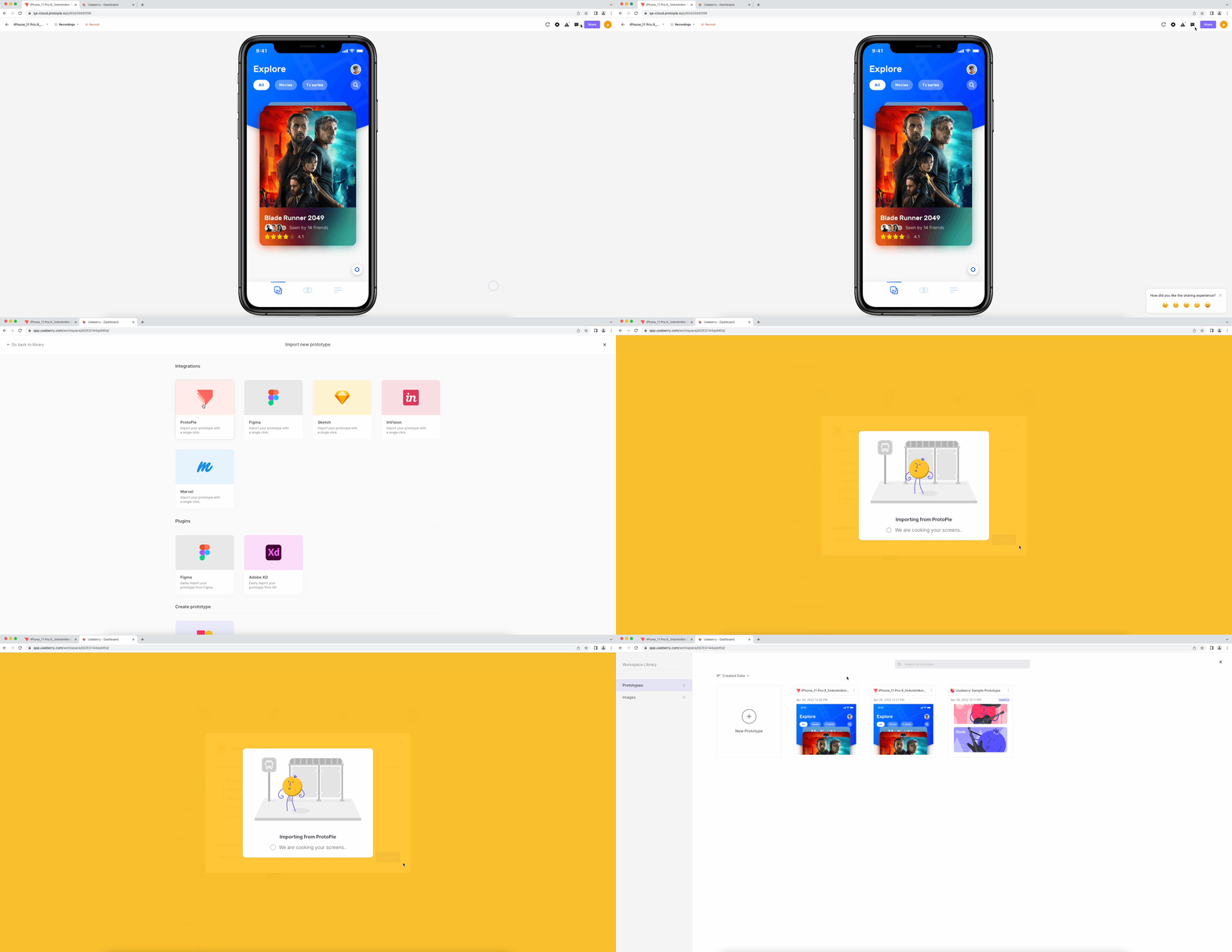
デスクトップまたはモバイルブラウザで、ProtoPie と Useberry を使ったモデレートなしのユーザーテストを簡単に設定できます。

{'_type': 'localeString', 'en': 'usertesting-userberry'}
  1. ProtoPie Cloud でテストしたいプロトタイプを開きます。

  2. リンクを知っている人なら誰でもプロトタイプを閲覧できるようにしてください。詳しく見る でアクセス設定について確認できます。

  3. 共有 をクリックし、リンクをコピー を選択します。

  4. このリンクを使用して、Useberry ワークスペースに新しいプロトタイプを追加します。

詳しく見る で、ProtoPie と Useberry を一緒に使用する方法の詳細をご確認ください。

ProtoPie & Lookback を使用したユーザーテスト

{'_type': 'localeString', 'en': 'usertesting-lookback'}

ProtoPie と Lookback を使用して、デスクトップまたはモバイルブラウザ、あるいは iOS、iPadOS、Android の ProtoPie Player で、モデレートなしのユーザビリティテストを簡単に設定できます。

詳しく見る で、ProtoPie と Lookback を一緒に使用する方法の詳細をご確認ください。

ProtoPie & UserTesting を使用したユーザーテスト

{'_type': 'localeString', 'en': 'usertesting-usertesting'}

デスクトップまたはモバイルブラウザ、あるいは iOS、iPadOS、Android の ProtoPie Player を使用して、ProtoPie と UserTesting でモデレートなしのユーザビリティテストを簡単に設定できます。

詳しく見る で、ProtoPie と UserTesting を一緒に使用する方法の詳細をご確認ください。

ProtoPie & UserZoom GO を使用したユーザーテスト

{'_type': 'localeString', 'en': 'usertesting-userzoomgo'}

デスクトップまたはモバイルブラウザ、あるいは iOS、iPadOS、Android の ProtoPie Player で、ProtoPie & UserZoom GO を使ったモデレートなしのユーザビリティテストを簡単に設定できます。

詳しく見る で、ProtoPie と UserZoom GO を一緒に使用する方法の詳細をご確認ください。