ProtoPie MCP ベータ版を提供開始!詳しくはこちら。

ProtoPie MCPのベータ版が提供開始!

Introducing ProtoPie

始める

Making Your First Prototype

ProtoPie Ecosystem

ProtoPie Studio Interface

Import

始める

Importing From Adobe XD

Importing From Figma

Importing From Sketch

ProtoPie Genie

Basic Elements

Containers

Devices

Layers

Preview Window

Scenes

Scroll/Paging

Shortcuts

System Status Bar

Triggers & Responses

Easing

Annotations

Responses

Timelines

Triggers

Formulas

始める

Functions

Layer Properties

Syntax

Formulas Use Cases

Variables

始める

Variables

Predefined Variables

Variables Use Cases

AI

始める

AI Interaction Creation

AI Document Q&A

AI Panel Interface

Tips for Best Results

ProtoPie MCP

Getting Started

Studio MCP 概要

Studio MCP インストールとセットアップ

Code MCP 概要

Code MCP インストールとセットアップ

Dev View

Auto Layout

시작하기

Auto Layout Properties

Components

始める

Component Guides

Editing Components

Nested Components

Send & Receive Messages

Interaction Libraries

始める

Managing Interaction Libraries

Managing Library Members

Voice Prototyping

Getting Started

Listen Response

Speak Response

Use Cases

Voice Command Trigger

Connecting Devices

Connecting blokdots

Connecting Mobile Devices

ProtoPie Cloud

始める

Managing Prototypes

Managing Storage

Sharing Prototypes

ProtoPie Player

Testing Prototypes

Managing Fonts

Offline Testing

ProtoPie Player for Wear OS

Teams

始める

Editors & Viewers

Onboarding Your Team

Projects

Team Owner & Team Admin

Handoff

始める

Creating Interaction Recordings

Managing Interaction Recordings

Recording Page

User Testing

始める

Overview

Creating Test Rooms

External Integrations

Managing Test Sessions

Test Results & Analysis

User Testing on ProtoPie Cloud

ProtoPie Connect

始める

API Plugin

Arduino Plugin

blokdots Plugin

Connect Embedded

Custom Layer Integrations

Custom Plugins

Connect Devices

Gamepad Plugin

IFTTT Plugin

Logitech G29 Steering Wheel Plugin

Testing Prototypes

Feature Comparison

Unity Plugin

ProtoPie Enterprise

始める

Organization Settings

Service Admin

Single Sign-On (SSO)

Security

Overview

Access Control

Data Transit, Storage & Backup

Incident Response

Network & ProtoPie Player App Security

Physical Security

Risk Management

Menu

Introducing ProtoPie

始める

Making Your First Prototype

ProtoPie Ecosystem

ProtoPie Studio Interface

Import

始める

Importing From Adobe XD

Importing From Figma

Importing From Sketch

ProtoPie Genie

Basic Elements

Containers

Devices

Layers

Preview Window

Scenes

Scroll/Paging

Shortcuts

System Status Bar

Triggers & Responses

Easing

Annotations

Responses

Timelines

Triggers

Formulas

始める

Functions

Layer Properties

Syntax

Formulas Use Cases

Variables

始める

Variables

Predefined Variables

Variables Use Cases

AI

始める

AI Interaction Creation

AI Document Q&A

AI Panel Interface

Tips for Best Results

ProtoPie MCP

Getting Started

Studio MCP 概要

Studio MCP インストールとセットアップ

Code MCP 概要

Code MCP インストールとセットアップ

Dev View

Auto Layout

시작하기

Auto Layout Properties

Components

始める

Component Guides

Editing Components

Nested Components

Send & Receive Messages

Interaction Libraries

始める

Managing Interaction Libraries

Managing Library Members

Voice Prototyping

Getting Started

Listen Response

Speak Response

Use Cases

Voice Command Trigger

Connecting Devices

Connecting blokdots

Connecting Mobile Devices

ProtoPie Cloud

始める

Managing Prototypes

Managing Storage

Sharing Prototypes

ProtoPie Player

Testing Prototypes

Managing Fonts

Offline Testing

ProtoPie Player for Wear OS

Teams

始める

Editors & Viewers

Onboarding Your Team

Projects

Team Owner & Team Admin

Handoff

始める

Creating Interaction Recordings

Managing Interaction Recordings

Recording Page

User Testing

始める

Overview

Creating Test Rooms

External Integrations

Managing Test Sessions

Test Results & Analysis

User Testing on ProtoPie Cloud

ProtoPie Connect

始める

API Plugin

Arduino Plugin

blokdots Plugin

Connect Embedded

Custom Layer Integrations

Custom Plugins

Connect Devices

Gamepad Plugin

IFTTT Plugin

Logitech G29 Steering Wheel Plugin

Testing Prototypes

Feature Comparison

Unity Plugin

ProtoPie Enterprise

始める

Organization Settings

Service Admin

Single Sign-On (SSO)

Security

Overview

Access Control

Data Transit, Storage & Backup

Incident Response

Network & ProtoPie Player App Security

Physical Security

Risk Management

Timelines

Easily manage your responses in ProtoPie with the help of the timeline and valueline.

These visual tools provide a clear overview of your response parameters, including duration, start delay, and mapping range. Simply hover over a response in edit mode, and a range bar will appear, allowing you to easily modify these values by dragging. It's a convenient way to fine-tune your interactions.

ProtoPie’s timeline feature gives users granular control over game elements to achieve sequenced animations.


{'_type': 'localeString', 'en': 'bunny vs wolf game countdown'}

Note that timelines and valuelines are not displayed for responses connected to continuous triggers, as these triggers are not mapped to specific time values.

If you want to learn more about how to manage timelines to add smoothness to your animations, join the Mobile Game prototyping masterclass.

Timeline

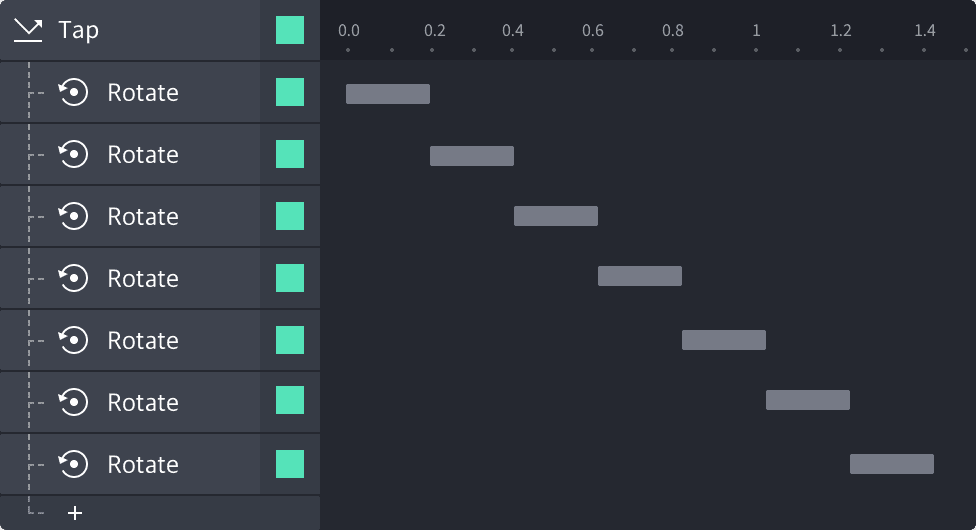
The timeline provides a clear visual representation of a response's time, delay, and repeat settings.

With the timeline, you can quickly select and modify multiple responses simultaneously. For example, if you want to change the delay or duration of several responses at once, simply select them on the timeline and make the adjustments in one go.


{'_type': 'localeString', 'en': 'img timeline'}

Valueline

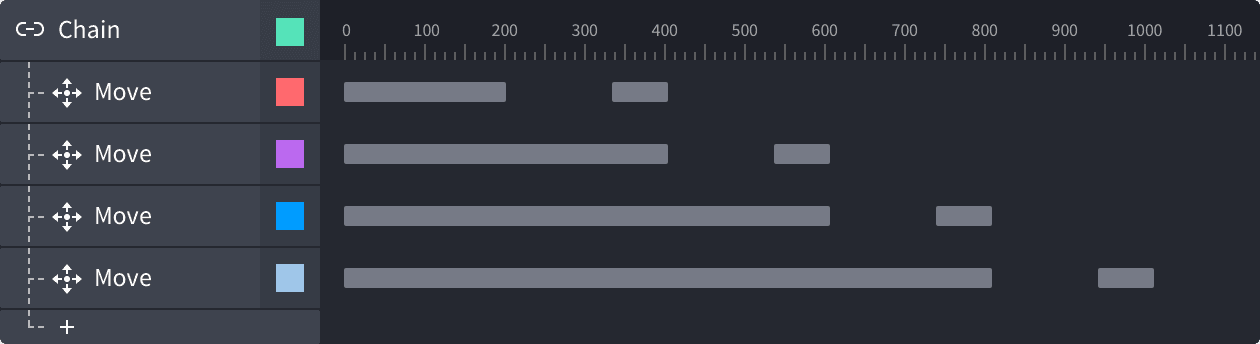
The valueline is a visual representation of a layer’s movement range, when its responses are linked to a Chain trigger.


{'_type': 'localeString', 'en': 'img valueline'}