
AI can generate interfaces in seconds. But building products still involves challenges that AI alone doesn’t solve: understanding interaction logic, keeping design intent, and translating complex behaviors into production-ready code without endless review cycles.
ProtoPie MCP brings native Model Context Protocol (MCP) support directly into ProtoPie, allowing AI agents like Claude Code, Cursor, Codex, VS Code, and others to interact directly with your prototypes. It’s available in beta at no additional cost for all Pro and Enterprise users.
Instead of relying on screenshots, videos, or written descriptions, AI can now work from the actual interaction model behind your design. The result is a faster, more accurate path from interaction design to implementation — while keeping designers in control of the experience.
What is ProtoPie MCP?
ProtoPie MCP is ProtoPie’s implementation of the Model Context Protocol (MCP) — an open standard that allows AI assistants to connect directly to external tools and structured data sources.
ProtoPie MCP introduces two complementary workflows:
Studio MCP helps you create and edit interactions inside ProtoPie using natural language.
Dev View & Code MCP help AI coding agents understand prototype behavior and generate cleaner handoff output.
What is ProtoPie Studio MCP?
ProtoPie Studio MCP connects ProtoPie Studio directly to your AI agents — including Claude Code, Codex, Cursor, VS Code, and other MCP-compatible clients. Instead of manually wiring every trigger, response, and formula, you can simply describe the interaction you want to create.
“Add a Tap trigger to this button.”
“Create a card that flips when tapped.”
“Analyze the interactions in this prototype.”
“Capture a preview of the current screen.”
And the best part? Every generated interaction remains fully editable inside ProtoPie Studio.
AI handles the repetitive setup work, while you remain in control of the experience.
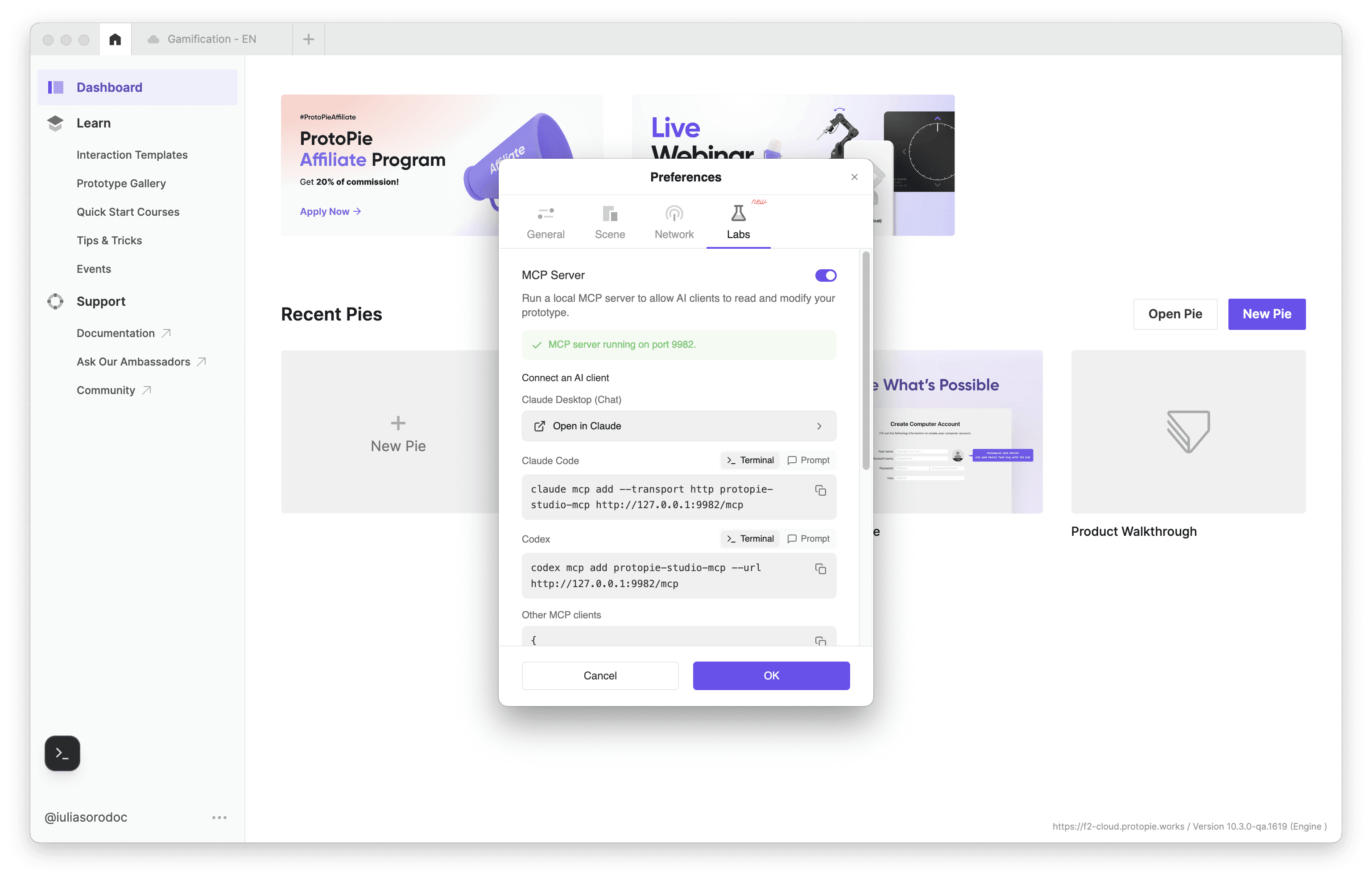
ProtoPie Studio MCP Benefits
Lower Barrier, Human Control: Create advanced interactions using natural language, then refine every detail manually for pixel-perfect results.
Bring Your Own Model: Use the AI tools and enterprise licenses your team already relies on, including Claude Code, Cursor, VS Code, Codex, and future MCP-compatible clients.
Project-Wide Context: Work across multiple prototypes with shared AI context — reuse components, reference interactions, and coordinate changes across files without losing continuity.
What is ProtoPie Code MCP?
ProtoPie Code MCP gives AI coding agents access to the interaction model behind your prototype — including scenes, layers, components, variables, formulas, states, interactions, and assets — enabling cleaner, more predictable implementation output.

ProtoPie Code MCP Benefits
Source of Truth: ProtoPie structures complex logic, formulas, and interactions for AI agents like Claude Code and Codex, enabling cleaner and more predictable code generation.
Zero-Friction Sharing: Share a single prototype link that teams can plug directly into their AI coding workflow — no ProtoPie account required.
Targeted Context: Use Dev View to inspect interactions visually and pass specific scenes, layers, or components to AI agents for more focused implementation.
Complete Handoff: Pair AI-generated output with ProtoPie’s native handoff toolkit — including interaction videos, logs, and timestamps — for a complete implementation package.
What is ProtoPie Dev View?
ProtoPie Dev View is ProtoPie’s Cloud-based handoff experience for inspecting prototype structure, interactions, assets, and implementation context.
Rather than sharing an entire prototype every time, teams can generate links for:
an entire prototype
a scene
a component
a specific layer
This allows AI coding agents to work from precise, targeted context instead of large, noisy prompts.

How Does ProtoPie Fit into AI Workflows?
ProtoPie MCP is designed to work with the AI tools your team already uses, whether that includes:
Claude Code
Cursor
Codex
VS Code
Antigravity
other MCP-compatible agents
ProtoPie becomes part of your existing AI workflow rather than another disconnected tool in the process.
Frequently Asked Questions
What is the difference between Studio MCP and Code MCP?
Studio MCP helps you create and edit interactions with AI inside ProtoPie Studio. Code MCP helps AI coding agents understand finished prototypes and generate implementation output from them.
Which AI agents are supported?
ProtoPie MCP works with MCP-compatible AI clients including Claude Code, Codex, Cursor, VS Code, Antigravity, and others. Support will continue to expand as the MCP ecosystem grows.
Which AI model should I use with ProtoPie MCP?
ProtoPie follows a Bring Your Own Model (BYOM) approach, allowing teams to use the AI providers they already standardize on. Models comparable to Claude Sonnet work well for simpler tasks, while Claude Opus-class models generally produce stronger results for complex interactions and implementation workflows.
Can ProtoPie Code MCP generate code for only part of a prototype?
Yes. Using Dev View, teams can share an entire prototype or target specific scenes, components, or layers to provide more focused context to AI coding agents.
Keep the Speed. Keep the Control
ProtoPie MCP removes repetitive setup work so your team can spend less time translating interactions and more time refining experiences.
AI accelerates the workflow. You shape the product.
Ready to Try ProtoPie MCP? Book a Demo and our experts will answer your questions.


