
AI prototyping tools promise instant prototypes from simple prompts. For design teams already using Figma and other prototyping software, the question becomes urgent: why add another tool when AI can generate interactive prototypes from anywhere?
The answer separates designers who merely generate outputs from those who validate product ideas with craft and precision. In a market democratizing generation, validation separates professional-grade prototyping from exploration tools. In data-driven organizations where stakeholders demand proof before investment, your ability to create high-fidelity, user-testable prototypes that simulate real interaction design, and then refine them with the intentionality that defines design excellence, determines whether ideas move forward or die in conversation. Anyone can prompt AI to create. What matters now is the refinement, the system thinking, and the quality that comes after generation.
Generation vs. Validation: Why the Distinction Matters
Today's AI prototyping tools fall into three categories, but only one is purpose-built for the validation stage where product decisions get made:
UI-Focused AI Tools (Figma AI, Figma Make, Framer AI)
These tools excel at generating screens with AI-powered interactions—animations, variables, conditional logic, and publishable web apps. Designed for rapid exploration, seamlessly integrated into familiar design workflows.
→ Optimized for visual exploration
The limitation: Interaction logic editing lacks visual transparency, complex behaviors require abstracted menus or regeneration.
Code Generation Tools (Cursor, Lovable, v0)
Vibe coding tools generate functional applications through conversational prompts, remarkably fast for initial output and working code.
→ Optimized for functional prototyping
The tradeoff: Every refinement requires re-prompting (costs accumulate).
Interaction-First AI Tools (ProtoPie AI)
Purpose-built for professional-grade interactive prototyping and UX validation, protothese tools generate editable interaction logic that designers refine visually without code. AI accelerates initial setup while designers apply craft and precision to create validation-ready prototypes for stakeholder and user testing.
The advantage: Visual editing of both appearance AND behavioral logic, professional-grade validation before committing engineering resources.
Quick Comparison: At a Glance
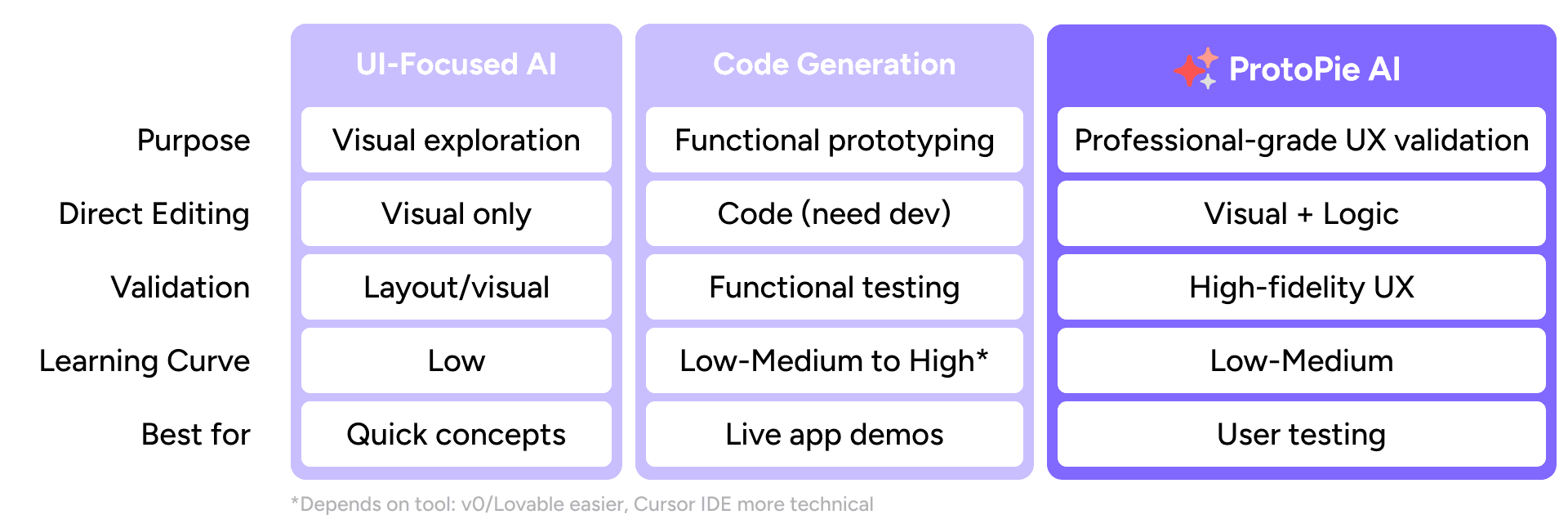
This AI prototyping tools comparison shows how these approaches differ across key dimensions:
Key differences:
UI-Focused AI tools excel at visual exploration with direct editing of layout and appearance, but interaction logic requires abstracted menus or regeneration.
Code-gen tools optimize for functional prototyping but require re-prompting or development expertise for refinement.
ProtoPie AI provides professional-grade validation through visual editing of both appearance AND interaction logic, enabling direct refinement of behavioral flows without re-prompting or coding.
Why Generation Speed Alone Doesn’t Enable Validation
AI prototyping tools, from UI-focused platforms to code generation tools, have transformed early exploration. All of them can now generate impressive, dynamic prototypes, and many now offer direct editing of visual properties. The friction point isn't visual editability; it's interaction logic transparency and control.
Here's the constraint:
UI-focused AI tools let you edit what you see—layout, text, spacing, colors—directly on the canvas after generation. But editing how the prototype behaves requires a different workflow.
Code generation tools face a parallel challenge. You can see the output, but refining the behavioral logic requires re-prompting or diving into generated code.
Consider a multi-step form, each field needs:
Validation rules - email format, password strength, required fields
Conditional visibility - show error states only after submission
Coordinated state management - disable submit button until all fields pass
In UI-focused tools, you can access these behaviors through prototype panels and variable menus, but there's no timeline or logic map showing how interactions connect.
In code-gen tools, the logic exists in generated code that requires development expertise to modify.
→ Both approaches lack visual transparency into the behavioral model.
For adjustments beyond basic transitions, the workflow becomes:
Describe the behavioral change
Wait for regeneration
Evaluate the result
This works for simple prototypes. For validation-ready prototypes requiring precision control over conditional logic, timing curves, or multi-state behaviors, the lack of visual interaction editing becomes a constraint.
More critically, your interactive prototyping capabilities determine your value to data-driven organizations. Stakeholders need product designers who can create high-fidelity prototypes that accurately simulate product behavior and deliver testable user experiences. If your toolkit lets you adjust appearances but not behavioral logic with visual clarity, you're competing at a disadvantage.
From Design Concept to User-Testable Prototype
ProtoPie AI doesn't replace your design tools, it completes the UX design workflow. Design UI in Figma, import to ProtoPie, then leverage AI to accelerate the initial interaction setup while you refine with the craft and precision that defines design excellence. AI handles the grunt work; you bring the intention, quality, and attention to detail that transforms functional interactions into exceptional user experiences. You're not migrating prototyping software, you're extending capabilities while maintaining your design systems.
Where Speed Meets Craft: AI as Your Starting Point, Not Your Endpoint
The value of AI prototyping lies not in automation alone, but in freeing designers to focus on what truly differentiates: system thinking, interaction quality, and the craft of translating complexity into clarity.
Editable Blueprints, Not Black Boxes
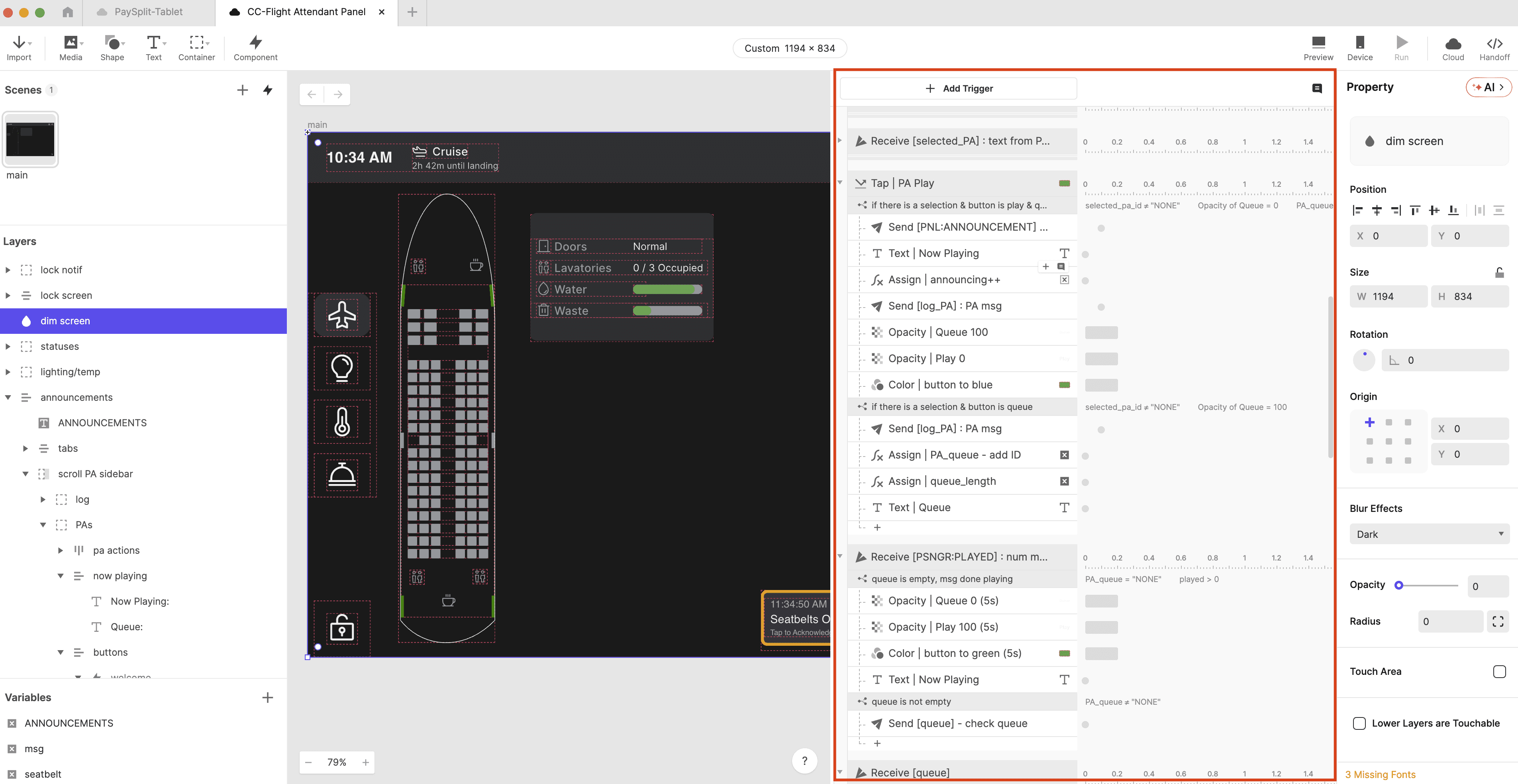
ProtoPie AI generates fully transparent, visually editable interaction logic. You can see exactly what triggers activate which responses, modify timing curves directly in a timeline view, adjust conditional logic through visual flow editing, no code, no abstracted menus, no hidden connections. This visual transparency into behavioral logic is essential for creating high-fidelity prototypes that stakeholders and users can validate. You're editing the interaction model itself, not just navigating property panels
Expert-Grade Control Without Re-Prompting
Generated an interaction that's 90% correct? Edit the remaining 10% directly in the interactive prototyping interface. Refine conditional logic, adjust timing curves, control multi-state behaviors, expert-grade capabilities without re-prompting or code. This eliminates the prompting cycle that makes code-gen tools costly at scale and gives you the control needed to simulate precise user experience behavior for testing.
Context-Aware Generation
ProtoPie AI understands your scene structure, variables, and layer hierarchy, a meaningful technical advantage over prompt-only tools. It reuses existing variables, respects naming conventions, and generates interactions that fit naturally into your prototype's logic. This context awareness is critical for maintaining consistency across complex validation scenarios without manual reconfiguration.
Cost-Efficient Refinement
Manual refinement doesn't require additional AI calls, keeping token costs predictable. Generate the foundation with AI, then refine to create user-testable, high-fidelity prototypes manually.
The Strategic Question: Can You Validate Before You Build?
For design teams and executives evaluating UX validation tools: can you prove product ideas work through user testing before committing engineering resources?
Data-driven organizations require validated concepts tested with real users, not just generated demos. When you need high-fidelity prototypes that simulate complex interaction design and enable user testing with realistic experiences, you need interactive prototyping tools purpose-built for validation.
ProtoPie AI delivers both speed and validation depth, fast AI generation for the foundation, precise manual control for creating user-testable prototypes with accurate user experience simulations, and integrating with your existing UX design workflow.
Choosing Your Competitive Advantage
The right AI prototyping software depends on what you're proving and to whom:
Early exploration and rapid concept generation: Code-gen tools and UI-focused AI offer unmatched speed for rapid iteration through prompts
High-fidelity interactive prototypes needing precision validation: Interaction design tools provide both AI generation speed and direct refinement control without re-prompting
For enterprise teams and individual designers alike, the question isn't whether to use AI for prototyping, it's which approach gives you the interactive prototyping capabilities that user testing and data-driven validation demand. Generation is now democratized across tools. The differentiator is refinement: prompt-based iteration vs. direct manual control.
In organizations that dominate through validated product decisions, product designers who can create high-fidelity prototypes and prove user experience concepts before engineering investment become indispensable. ProtoPie AI is purpose-built as prototyping software for that reality: where AI speed gets ideas on the table, but the ability to refine with precision, not re-prompt with hope, delivers user-testable prototypes that keep you ahead of the market.
Your interactive prototyping capabilities define your value in product design. Choose prototyping software that gives you both: AI generation for speed and direct editing for the craft, precision, and professional-grade validation that design excellence demands.
Ready to see how ProtoPie AI combines rapid generation with validation-grade control?


