INSIGHTS & INSPIRATION
PRODUCT LEARNING & SUPPORT
INSIGHTS & INSPIRATION
PRODUCT LEARNING & SUPPORT
Account & Login
Plans & Pricing
Billing & payments
Troubleshoooting
Menu
Account & Login
Plans & Pricing
Billing & payments
Troubleshoooting
Logging in
i-cannot-log-into-protopie-what-should-i-do
I cannot log into ProtoPie; what should I do?
Having trouble logging into ProtoPie Studio? Here’s what to check:
Internet connection: Ensure you have a stable internet connection.
Correct account: Ensure you’re logging in with the correct ProtoPie account.
Device limit: ProtoPie Studio can be used on up to 2 devices per account simultaneously. You can manage your devices in the account settings if you've reached this limit.
Proxy settings: If you are using a proxy server, it could interfere with your login. Check ProtoPie’s proxy configuration to ensure it’s set up correctly.
It might be a network issue if the login button is unresponsive or you can’t log in. Firewalls or security programs could be blocking access to ProtoPie’s cloud services. To resolve this, we recommend whitelisting the following URLs:
This can help bypass any network restrictions that might be preventing login.
i-cannot-log-into-protopie-what-should-i-do
I cannot log into ProtoPie; what should I do?
Having trouble logging into ProtoPie Studio? Here’s what to check:
Internet connection: Ensure you have a stable internet connection.
Correct account: Ensure you’re logging in with the correct ProtoPie account.
Device limit: ProtoPie Studio can be used on up to 2 devices per account simultaneously. You can manage your devices in the account settings if you've reached this limit.
Proxy settings: If you are using a proxy server, it could interfere with your login. Check ProtoPie’s proxy configuration to ensure it’s set up correctly.
It might be a network issue if the login button is unresponsive or you can’t log in. Firewalls or security programs could be blocking access to ProtoPie’s cloud services. To resolve this, we recommend whitelisting the following URLs:
This can help bypass any network restrictions that might be preventing login.
on-how-many-computers-can-i-use-protopie-with-one-account
What is the device limit for using ProtoPie with the same account?
For the Free and Basic plans, each account is limited to use on one device. The Pro and Enterprise plans allow the use of up to two devices per account. Please note that this limit cannot be increased.
You can manage the computers you are logged into in your account settings, under profile.
on-how-many-computers-can-i-use-protopie-with-one-account
What is the device limit for using ProtoPie with the same account?
For the Free and Basic plans, each account is limited to use on one device. The Pro and Enterprise plans allow the use of up to two devices per account. Please note that this limit cannot be increased.
You can manage the computers you are logged into in your account settings, under profile.
what-should-i-do-if-my-company-is-using-a-proxy-server
How can I ensure ProtoPie works if my company uses a proxy server?
Follow the steps below in ProtoPie Studio if your connection uses a proxy server due to security reasons.
Open Preferences
Go to Network and select Use System Proxy Settings
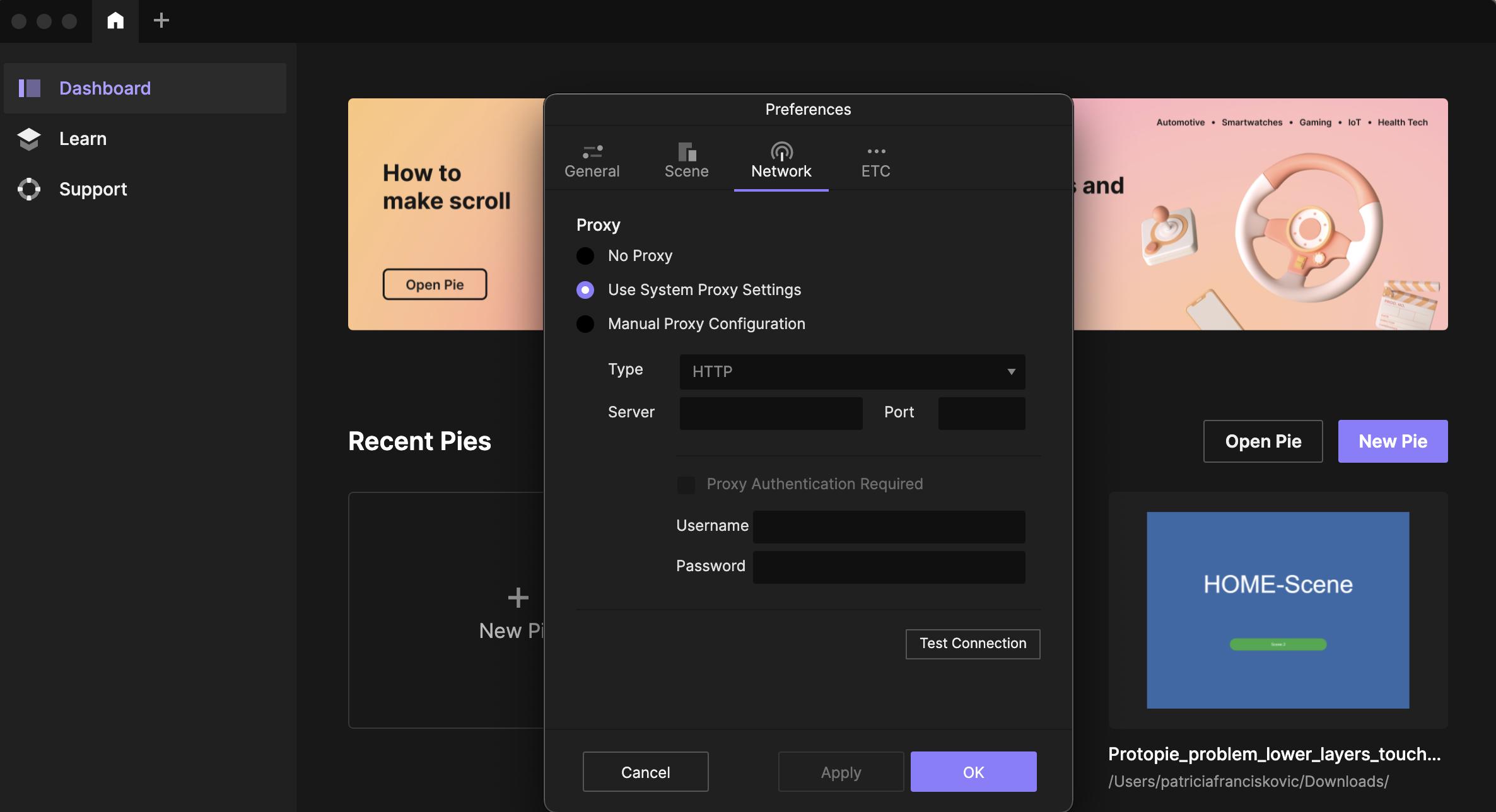
Additionally, ask your IT admin to whitelist the following URLs to allow ProtoPie Studio to bypass the proxy server:
If the suggested fixes don't resolve your issue, consider ProtoPie Enterprise. This plan is tailored for teams and organizations looking to collaborate securely in their own environment.
what-should-i-do-if-my-company-is-using-a-proxy-server
How can I ensure ProtoPie works if my company uses a proxy server?
Follow the steps below in ProtoPie Studio if your connection uses a proxy server due to security reasons.
Open Preferences
Go to Network and select Use System Proxy Settings
Additionally, ask your IT admin to whitelist the following URLs to allow ProtoPie Studio to bypass the proxy server:
If the suggested fixes don't resolve your issue, consider ProtoPie Enterprise. This plan is tailored for teams and organizations looking to collaborate securely in their own environment.