INSIGHTS & INSPIRATION
PRODUCT LEARNING & SUPPORT
INSIGHTS & INSPIRATION
PRODUCT LEARNING & SUPPORT
Account & Login
Plans & Pricing
Billing & payments
Troubleshoooting
Menu
Account & Login
Plans & Pricing
Billing & payments
Troubleshoooting
Import > Importing From Adobe XD FAQs
importing-from-adobe-xd-encountered-a-problem-what-should-i-do
Importing from Adobe XD encountered a problem. What should I do?
This only applies to the legacy Adobe XD import available in ProtoPie 5.2 or lower.
If you receive the error message "Importing from Adobe XD encountered a problem" while importing a file from Adobe XD into ProtoPie on macOS, try the following.
ProtoPie must have access to Adobe XD's data folder in order for the import to work. You need to verify that the folder's read and write permission is set up correctly in your system.
To do so, click on the Spotlight icon in the top right corner of your screen to run queries.

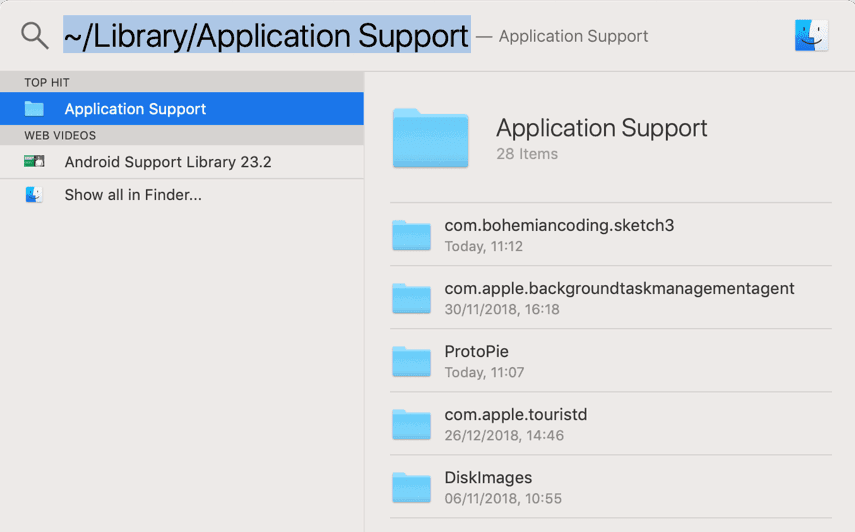
Enter "~/Library/Application Support" in the search bar and open the Application Support folder. Right-click on it and press Get Info.
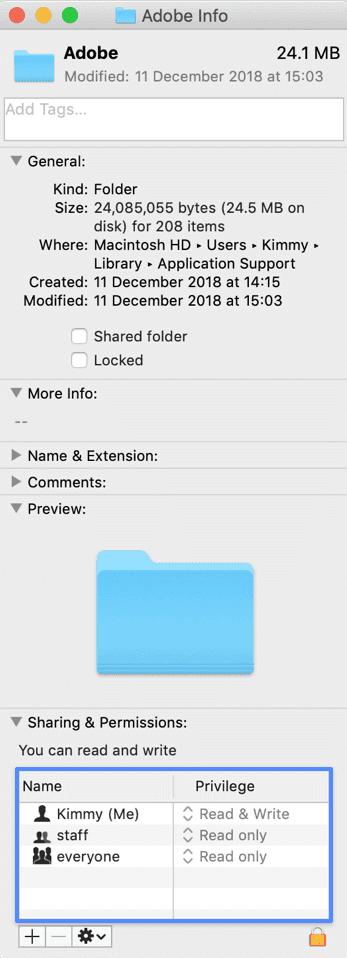
At the bottom of the Info window, you may find the Sharing & Permissions section. Expand this section and click on the [+] button in the left bottom corner to add permission. If needed, click on the lock icon to unlock the permissions settings (this would require an administrator name and password).
From the list of Users & Groups, please select the username you are currently logged in with on macOS and press Select to add it to the permission list.
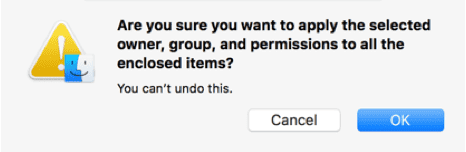
Click on the gear icon and select "Apply to enclosed items…". Press OK to apply the permissions to all enclosed items.
Close the info window and restart both ProtoPie Studio and Adobe XD.
Contact us if you need more help.
importing-from-adobe-xd-encountered-a-problem-what-should-i-do
Importing from Adobe XD encountered a problem. What should I do?
This only applies to the legacy Adobe XD import available in ProtoPie 5.2 or lower.
If you receive the error message "Importing from Adobe XD encountered a problem" while importing a file from Adobe XD into ProtoPie on macOS, try the following.
ProtoPie must have access to Adobe XD's data folder in order for the import to work. You need to verify that the folder's read and write permission is set up correctly in your system.
To do so, click on the Spotlight icon in the top right corner of your screen to run queries.
Enter "~/Library/Application Support" in the search bar and open the Application Support folder. Right-click on it and press Get Info.
At the bottom of the Info window, you may find the Sharing & Permissions section. Expand this section and click on the [+] button in the left bottom corner to add permission. If needed, click on the lock icon to unlock the permissions settings (this would require an administrator name and password).
From the list of Users & Groups, please select the username you are currently logged in with on macOS and press Select to add it to the permission list.
Click on the gear icon and select "Apply to enclosed items…". Press OK to apply the permissions to all enclosed items.
Close the info window and restart both ProtoPie Studio and Adobe XD.
Contact us if you need more help.