

INDUSTRIES

Automotive

Aviation

Finance

Gaming

MedTech

IoT

Digital Products

USE CASES

For Enterprise

For Individuals

For Teams

For education

KEY FEATURES

Hardware & System Integration

Beta

ProtoPie MCP

Multi-Device Prototyping

Interaction Logic

Developer Handoff

ProtoPie AI

New

User Testing

PLUGINS

Figma

Sketch

Adobe XD

INSIGHTS & INSPIRATION

Blog

eBooks

Clients Success Stories

Events & Webinars

ProtoPie Gallery

PRODUCT LEARNING & SUPPORT

ProtoPie School

Download ProtoPie

Product Documentation

Community

INDUSTRIES

Automotive

Aviation

Finance

Gaming

MedTech

IoT

Digital Products

USE CASES

For Enterprise

For Individuals

For Teams

For education

KEY FEATURES

Hardware & System Integration

Beta

ProtoPie MCP

Multi-Device Prototyping

Interaction Logic

Developer Handoff

ProtoPie AI

New

User Testing

PLUGINS

Figma

Sketch

Adobe XD

INSIGHTS & INSPIRATION

Blog

eBooks

Clients Success Stories

Events & Webinars

ProtoPie Gallery

PRODUCT LEARNING & SUPPORT

ProtoPie School

Download ProtoPie

Product Documentation

Community

Ask ProtoPie

1

min read

How to Use Components in ProtoPie

This session dives into how to master communication between Components and Scenes in ProtoPie.

ProtoPie,

This session dives into how to master communication between Components and Scenes in ProtoPie.

What you’ll learn

  1. Components - Prototype within a prototype

  2. ProtoPie's messaging system - Send response & Receive trigger

  3. Smart home app tutorial

In this ProtoPie tutorial, you’ll be able to make something like this.
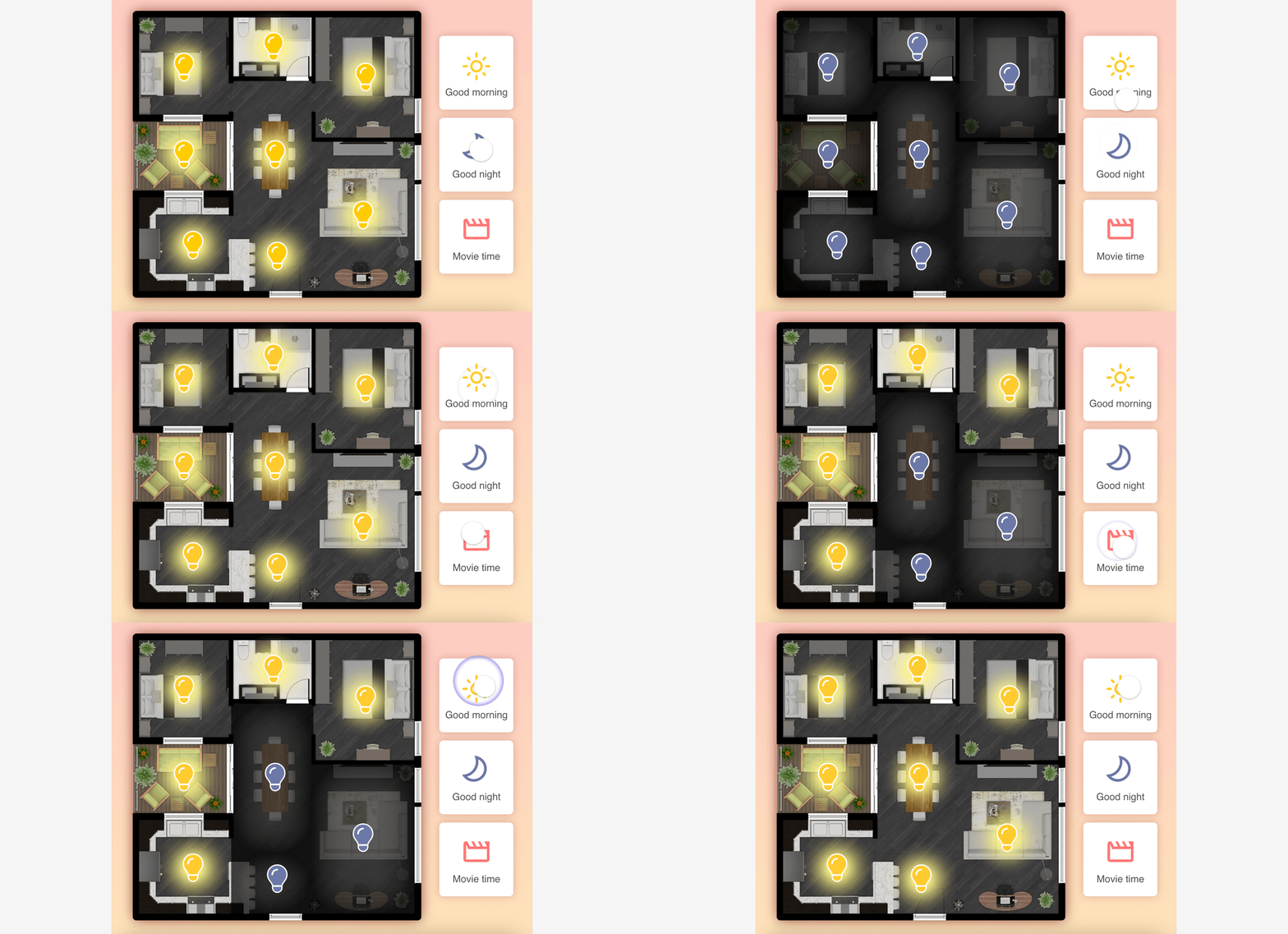

Smart home prototype using Send and Receive.


Smart home prototype using Send and Receive.

Starting Pie FileCompleted Pie File

Video

Learn more

ProtoPie School: ProtoPie’s free learning content designed to help you build your prototyping expertise. Enroll for free.

Components - Getting Started

Intro to ProtoPie Connect 1 of 7: Use Send and Receive to Make Multiple Pies Talk in Studio