INSIGHTS & INSPIRATION
PRODUCT LEARNING & SUPPORT
INSIGHTS & INSPIRATION
PRODUCT LEARNING & SUPPORT
Account & Login
Plans & Pricing
Billing & payments
Troubleshoooting
Menu
Account & Login
Plans & Pricing
Billing & payments
Troubleshoooting
インポート > Figmaからのインポートに関するFAQ
why-does-it-take-so-long-to-import-my-designs-from-figma
Figmaからデザインをインポートするのに、なぜこれほど時間がかかるのですか?
ProtoPieへのデザインのインポートにおいて問題が発生していませんか?以下に一般的なトラブルシューティングの手順をご紹介します:
Figma、Sketch、Adobe XD、そしてそれに対応するProtoPieプラグインが最新バージョンであることをご確認ください。
十分な帯域幅を持つ、高速で安定したインターネット接続をご利用いただいているかご確認ください。
why-does-it-take-so-long-to-import-my-designs-from-figma
Figmaからデザインをインポートするのに、なぜこれほど時間がかかるのですか?
ProtoPieへのデザインのインポートにおいて問題が発生していませんか?以下に一般的なトラブルシューティングの手順をご紹介します:
Figma、Sketch、Adobe XD、そしてそれに対応するProtoPieプラグインが最新バージョンであることをご確認ください。
十分な帯域幅を持つ、高速で安定したインターネット接続をご利用いただいているかご確認ください。
why-have-some-layers-been-imported-from-figma-incorrectly
Figmaの一部のレイヤーが正しくインポートされなかったのはなぜですか?
一部のレイヤーが正常にインポートされていないことに気付いた場合、サポートされていないプロパティが原因である可能性があります。Figma、Sketch、またはAdobe XDからデザインをインポートする際にサポートされているプロパティの詳細情報を提供している、インポートドキュメントを確認することをお勧めします。
why-have-some-layers-been-imported-from-figma-incorrectly
Figmaの一部のレイヤーが正しくインポートされなかったのはなぜですか?
一部のレイヤーが正常にインポートされていないことに気付いた場合、サポートされていないプロパティが原因である可能性があります。Figma、Sketch、またはAdobe XDからデザインをインポートする際にサポートされているプロパティの詳細情報を提供している、インポートドキュメントを確認することをお勧めします。
partially-supported-properties-import-from-figma
部分的にサポートされているプロパティはどうなりますか?
Figmaの一部のデザインプロパティは、ProtoPieで部分的にしかサポートされていません。これらはエクスポートを妨げることはありませんが、インポート後に意図した通りに動作しない可能性があります。以下は一般的なケースです:
複数の塗りつぶし(Multiple fills):これらは編集可能なSVGとしてエクスポートされます。より高度にコントロールしたい場合は、各塗りつぶしを個別のレイヤーに分割するか、一番上または一番下の塗りつぶしだけを残すことを検討してください。
高度な境界線設定(Advanced stroke settings):これらもSVGとしてエクスポートされます。一貫性を保つため、エクスポートする前に境界線を長方形に変換することができます。
レイヤーのぼかし、または内側のシャドウ(Layer blur or inner shadow):これらの効果はエクスポート中に無視されます。必要な場合は、レイヤーをPNGにフラット化してください。ただし、このバージョンはProtoPieで編集できなくなります。
partially-supported-properties-import-from-figma
部分的にサポートされているプロパティはどうなりますか?
Figmaの一部のデザインプロパティは、ProtoPieで部分的にしかサポートされていません。これらはエクスポートを妨げることはありませんが、インポート後に意図した通りに動作しない可能性があります。以下は一般的なケースです:
複数の塗りつぶし(Multiple fills):これらは編集可能なSVGとしてエクスポートされます。より高度にコントロールしたい場合は、各塗りつぶしを個別のレイヤーに分割するか、一番上または一番下の塗りつぶしだけを残すことを検討してください。
高度な境界線設定(Advanced stroke settings):これらもSVGとしてエクスポートされます。一貫性を保つため、エクスポートする前に境界線を長方形に変換することができます。
レイヤーのぼかし、または内側のシャドウ(Layer blur or inner shadow):これらの効果はエクスポート中に無視されます。必要な場合は、レイヤーをPNGにフラット化してください。ただし、このバージョンはProtoPieで編集できなくなります。
error-layers-not-supported-import-from-figma
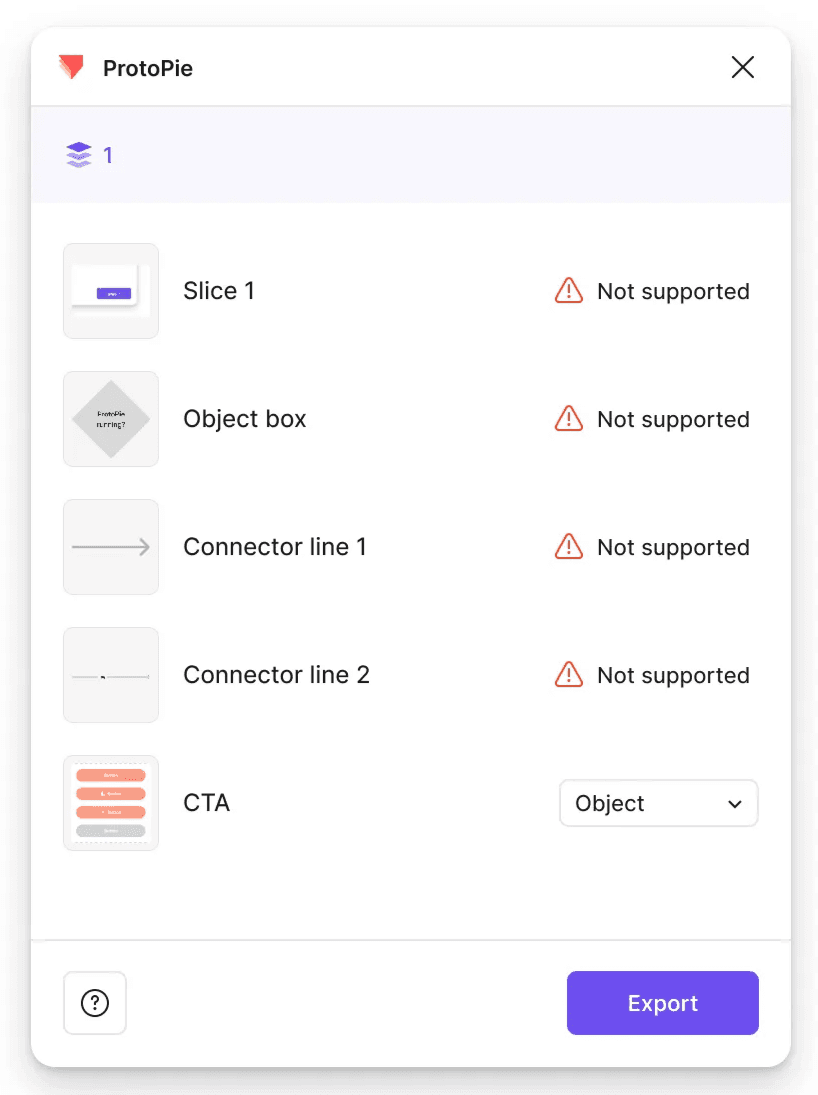
デザインをエクスポートする際に「対応していません」というメッセージが表示されました。どういう意味ですか?
このメッセージは、選択したレイヤーに、エクスポート時にProtoPieが完全にはサポートしていない要素やプロパティが含まれている場合に表示されます。これらのレイヤーをFigmaからインポートすることは可能ですが、機能の互換性における制限により、ProtoPie内での表示や動作が期待通りにならない場合があります。
error-layers-not-supported-import-from-figma
デザインをエクスポートする際に「対応していません」というメッセージが表示されました。どういう意味ですか?
このメッセージは、選択したレイヤーに、エクスポート時にProtoPieが完全にはサポートしていない要素やプロパティが含まれている場合に表示されます。これらのレイヤーをFigmaからインポートすることは可能ですが、機能の互換性における制限により、ProtoPie内での表示や動作が期待通りにならない場合があります。
supported-layers-import-from-figma
どのような種類のレイヤーがサポートされていますか?
フレーム、セクション、およびほとんどの基本的なレイヤーは問題なくエクスポートできます。ただし、スライスやFigJamのコネクタなどの一部の要素はエクスポートに対応していません。これらを使用している場合は、エクスポートする前にフレームまたは標準レイヤーに変換してみてください。
supported-layers-import-from-figma
どのような種類のレイヤーがサポートされていますか?
フレーム、セクション、およびほとんどの基本的なレイヤーは問題なくエクスポートできます。ただし、スライスやFigJamのコネクタなどの一部の要素はエクスポートに対応していません。これらを使用している場合は、エクスポートする前にフレームまたは標準レイヤーに変換してみてください。