行业

汽车

航空

金融

游戏

医疗科技

物联网

数字产品

使用场景

面向企业

面向个人

面向团队

用于教育

主要特点

硬件与系统集成

公测版

ProtoPie MCP

多设备原型设计

交互逻辑

开发交接

ProtoPie AI

用户测试

插件

Figma

Sketch

Adobe XD

洞见与灵感

博客

白皮书

客户成功案例

活动与网络研讨会

ProtoPie 画廊

产品学习与支持

ProtoPie 学堂

下载 ProtoPie

产品文档

社区

行业

汽车

航空

金融

游戏

医疗科技

物联网

数字产品

使用场景

面向企业

面向个人

面向团队

用于教育

主要特点

硬件与系统集成

公测版

ProtoPie MCP

多设备原型设计

交互逻辑

开发交接

ProtoPie AI

用户测试

插件

Figma

Sketch

Adobe XD

洞见与灵感

博客

白皮书

客户成功案例

活动与网络研讨会

ProtoPie 画廊

产品学习与支持

ProtoPie 学堂

下载 ProtoPie

产品文档

社区

提示

7

阅读时间

Aviation Cockpit Prototyping: How ProtoPie Connect Brings a Flight Simulator to Life

Go behind the scenes of how our Creative Technologies team built and tested a full-scale eVTOL cockpit prototype.

尤利娅·索罗多克, ProtoPie 的产品营销经理
aviation prototype screen

Table of Contents

  1. The Challenge: Prototyping an Aviation Cockpit, Not Just a Screen

  2. How to Build an Aviation Cockpit Prototype with ProtoPie

    1. Software for an Aviation Cockpit Prototype

    2. Hardware for an Aviation Cockpit Prototype

    3. How ProtoPie Connect Links the Flight Simulator to the Prototype

  3. Inside the Three Cockpit Displays

  4. How Long Does It Take to Build an Aviation Cockpit Prototype?

  5. Aviation Cockpit Prototyping: Frequently Asked Questions

  6. Beyond Aviation: Prototyping Hardware-Connected Experiences

  7. What “Mission-Critical” Means for Aviation Prototyping

Most interactive prototypes get to be forgiving. If a button animates a beat too slowly, or a screen lags behind a tap, the worst that happens is a slightly awkward user test. Aviation is different. When the interface you’re designing sits between a pilot and the controls of an aircraft, “close enough” isn’t good enough — the interaction has to be one-to-one with reality, because someone’s safety depends on it.

That’s the problem our Creative Technologies team set out to explore: could we build a cockpit experience realistic enough to actually fly, using nothing but ProtoPie, a flight simulator, and some off-the-shelf hardware?

We recently walked through the full build in a live webinar, with our Creative Technologist Eric Lee taking us behind the scenes of the project. This article covers the highlights, but the full webinar goes deeper into the live demo, the plugin code, and a Q&A covering everything from simulator compatibility to Unreal Engine support.

The Challenge: Prototyping an Aviation Cockpit, Not Just a Screen

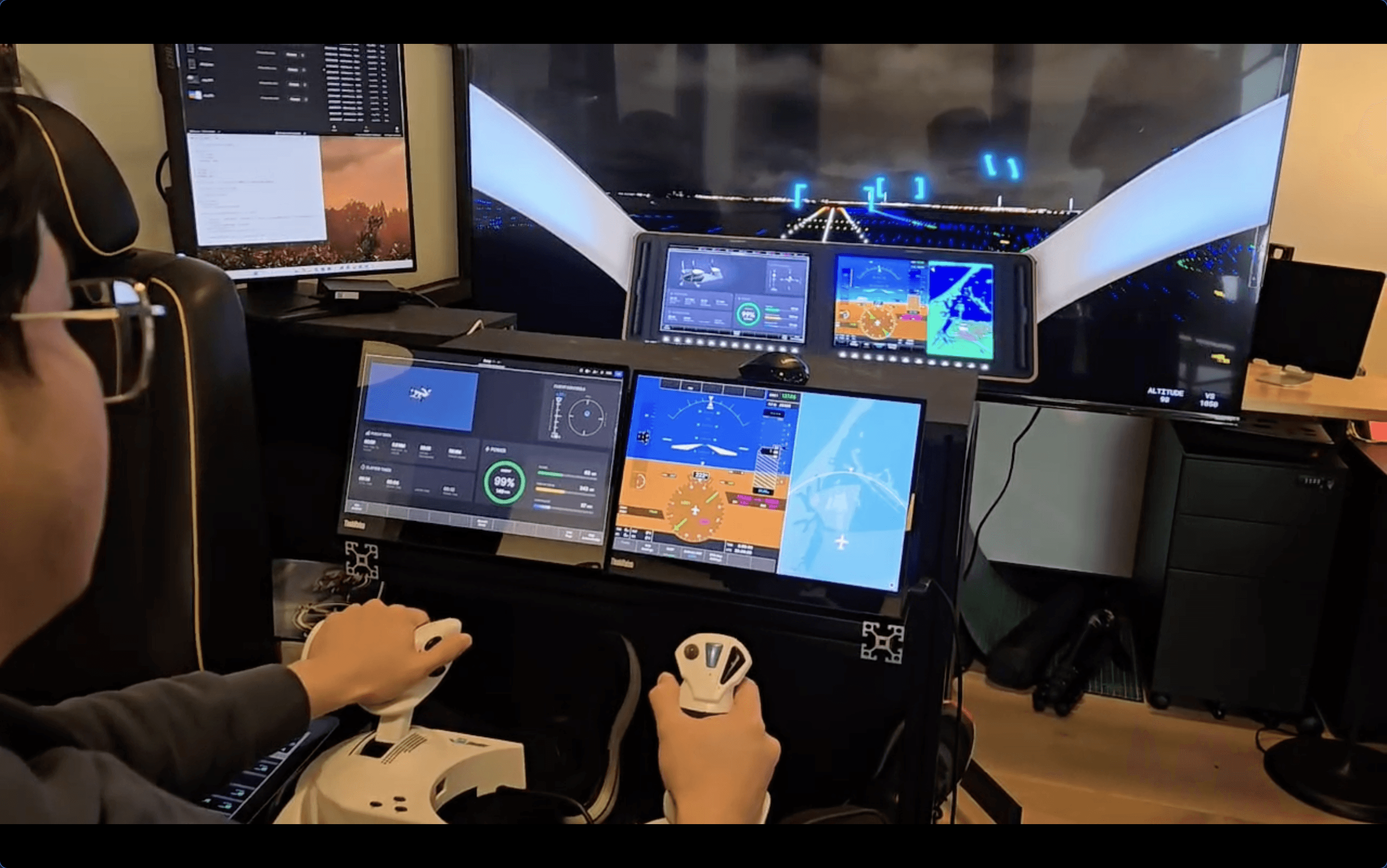
The team picked the Joby eVTOL as the aircraft to prototype. An eVTOL behaves like a helicopter and a fixed-wing aircraft in one vehicle, transitioning between hover and forward flight, which meant the cockpit UI had to represent two very different flight modes without becoming two different products.

The brief was to go beyond a static mockup and build something a pilot could genuinely operate: real flight controls, a real flight simulator driving the data, and screens that respond to that data exactly as the aircraft’s would. No pre-recorded animations. No simulated “what if” scenarios.

flight simulator screen protopie

How to Build an Aviation Cockpit Prototype with ProtoPie

Software for an Aviation Cockpit Prototype

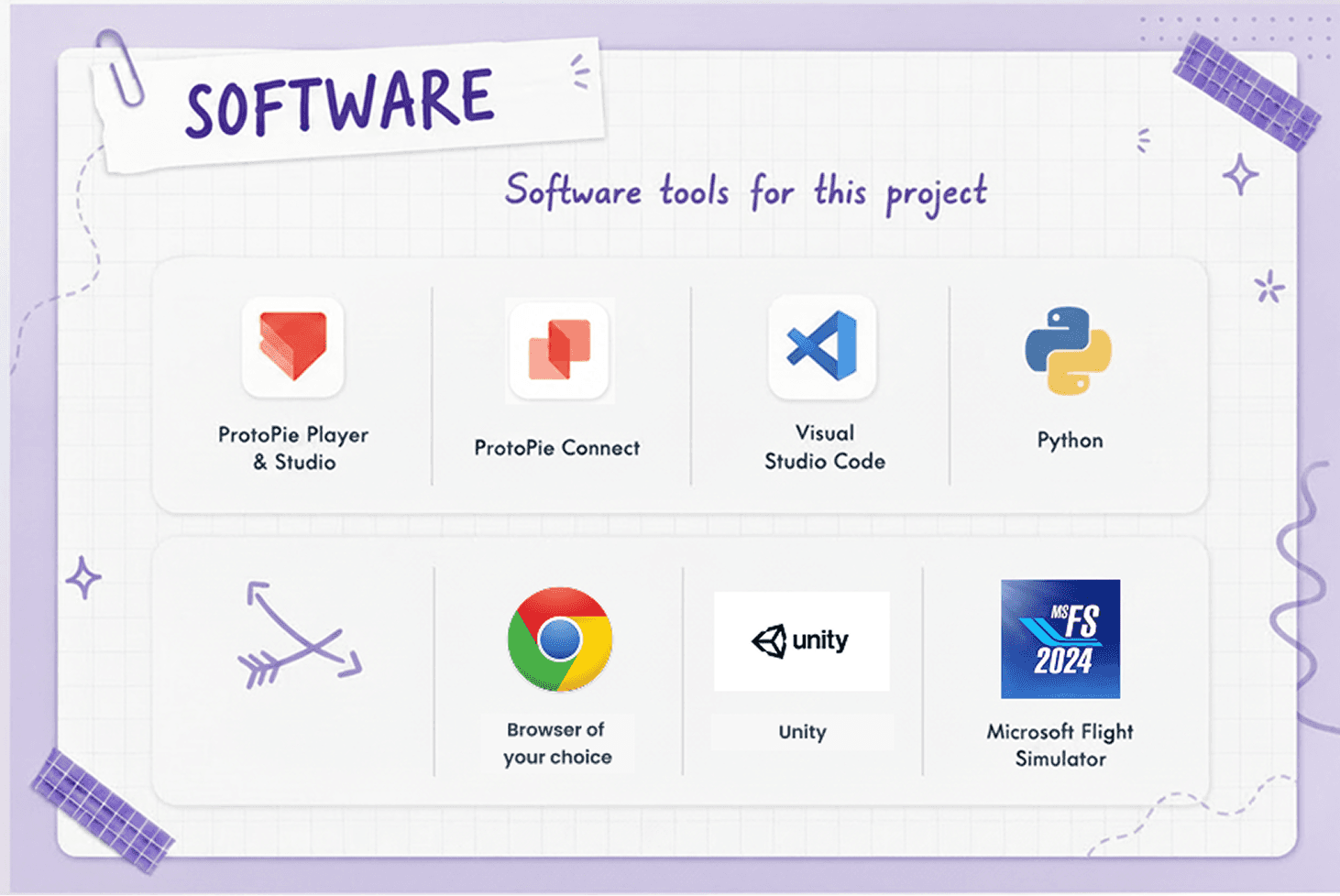
On the software side, the stack was:

  • ProtoPie Studio to design the interfaces

  • ProtoPie Player to run them

  • ProtoPie Connect to wire everything to live data

  • Visual Studio Code and Python for the bridge app logic

  • Unity for 3D layers

  • Microsoft Flight Simulator 2024 as the source of truth for flight data

  • a browser to host the prototypes as web views.

aviation prototyping software

Hardware for an Aviation Cockpit Prototype

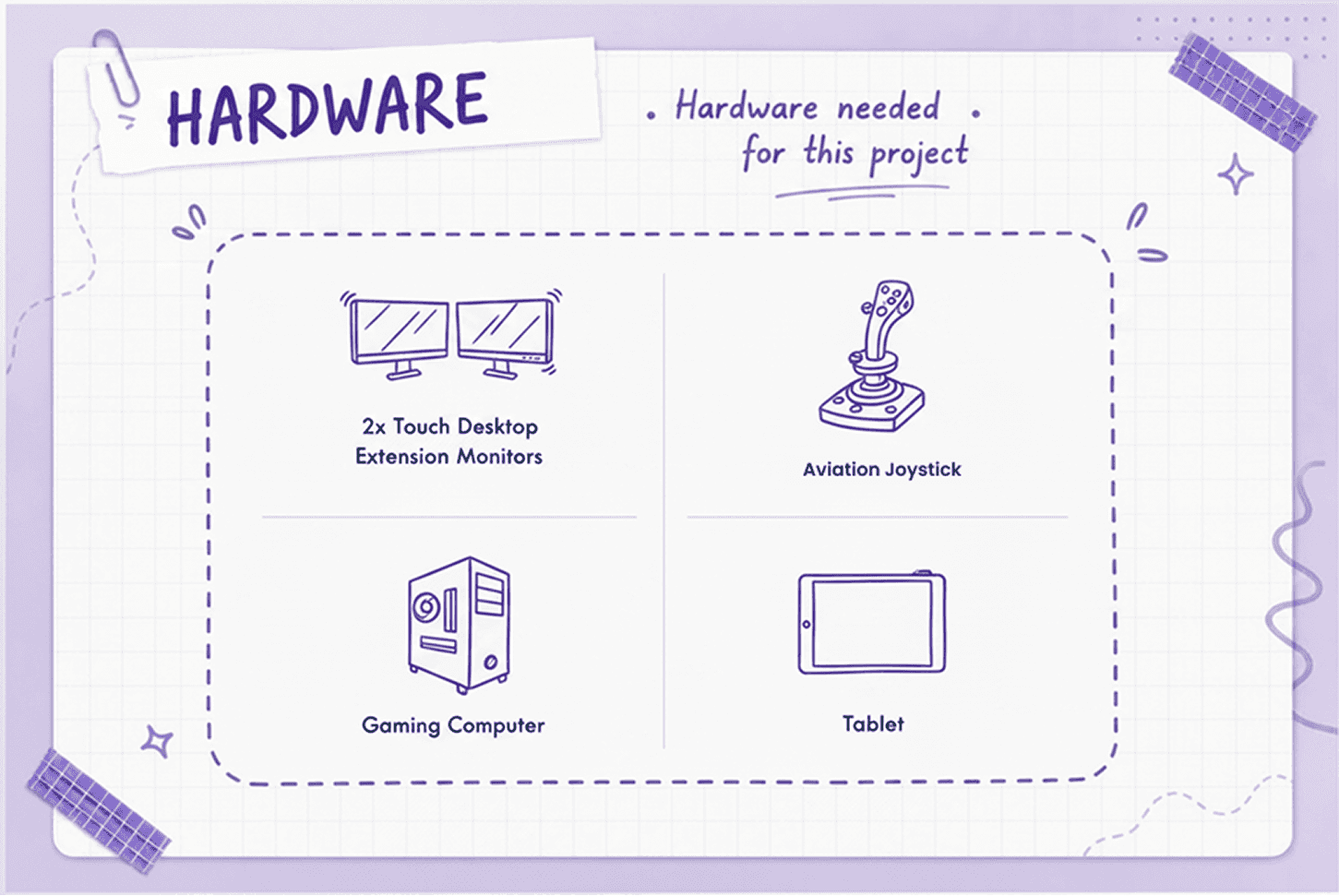
The hardware included:

  • two touchscreen monitors for the two main displays

  • a tablet for a secondary panel

  • an aviation joystick for actual flight input

  • a TV to run the simulator itself

  • a gaming PC with enough GPU headroom to run a flight simulator and drive every screen at once.

aviation prototyping

How ProtoPie Connect Links the Flight Simulator to the Prototype

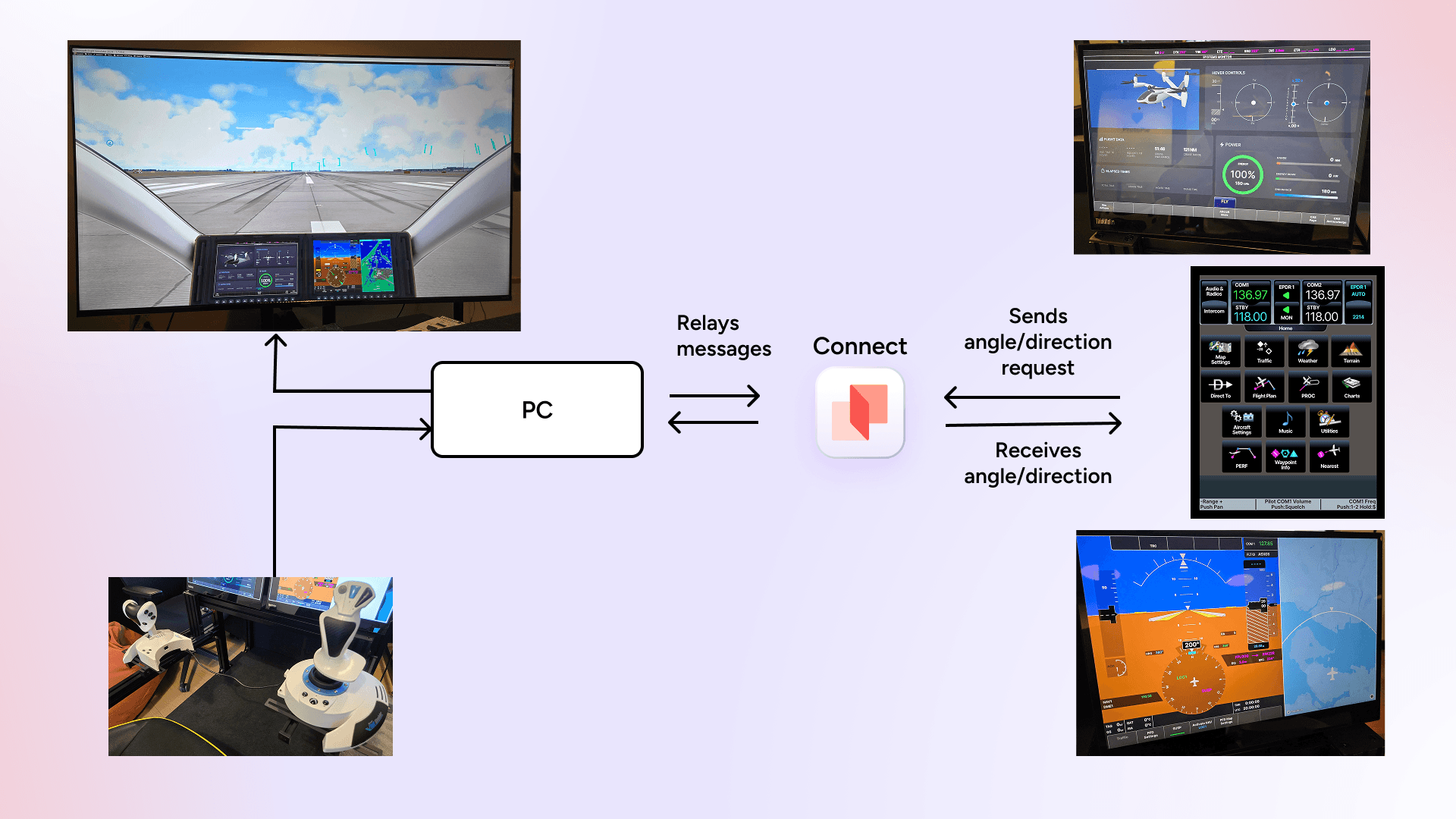
The architecture is simpler than the finished demo suggests. The flight simulator and joystick run on one PC. That PC also runs a small custom plugin, which listens to the simulator’s live flight variables — altitude, speed, heading, flight mode, and so on — and forwards them to ProtoPie Connect. Connect then distributes that data to however many prototypes need it, each running as its own browser-based screen.

In this build, that was three screens:

  1. a primary flight display

  2. a multi-function display

  3. and a simplified flight-plan panel

Connect’s web view, however, isn’t limited to three; a project like this could just as easily run five or six screens off the same pipeline.

aviation prototyping set up

Inside the Three Cockpit Displays

  1. The Multi-Function Display

The MFD (Multi-Function Display) handled power, flight controls, elapsed time, and range — plus a 3D model of the aircraft built in Unity and embedded directly into the ProtoPie prototype. That 3D layer wasn’t just decorative: the propellers physically rotate between vertical and horizontal as the aircraft transitions between hover and forward flight, mirroring what’s happening in the simulator in real time.

The Multi-Function Display
  1. The Primary Flight Display

The PFD (Primary Flight Display) carried the more safety-critical information: live speed, altitude, compass heading, and pitch and roll, laid over an embedded Mapbox layer showing the aircraft’s actual position on a real map.

Primary Flight Display
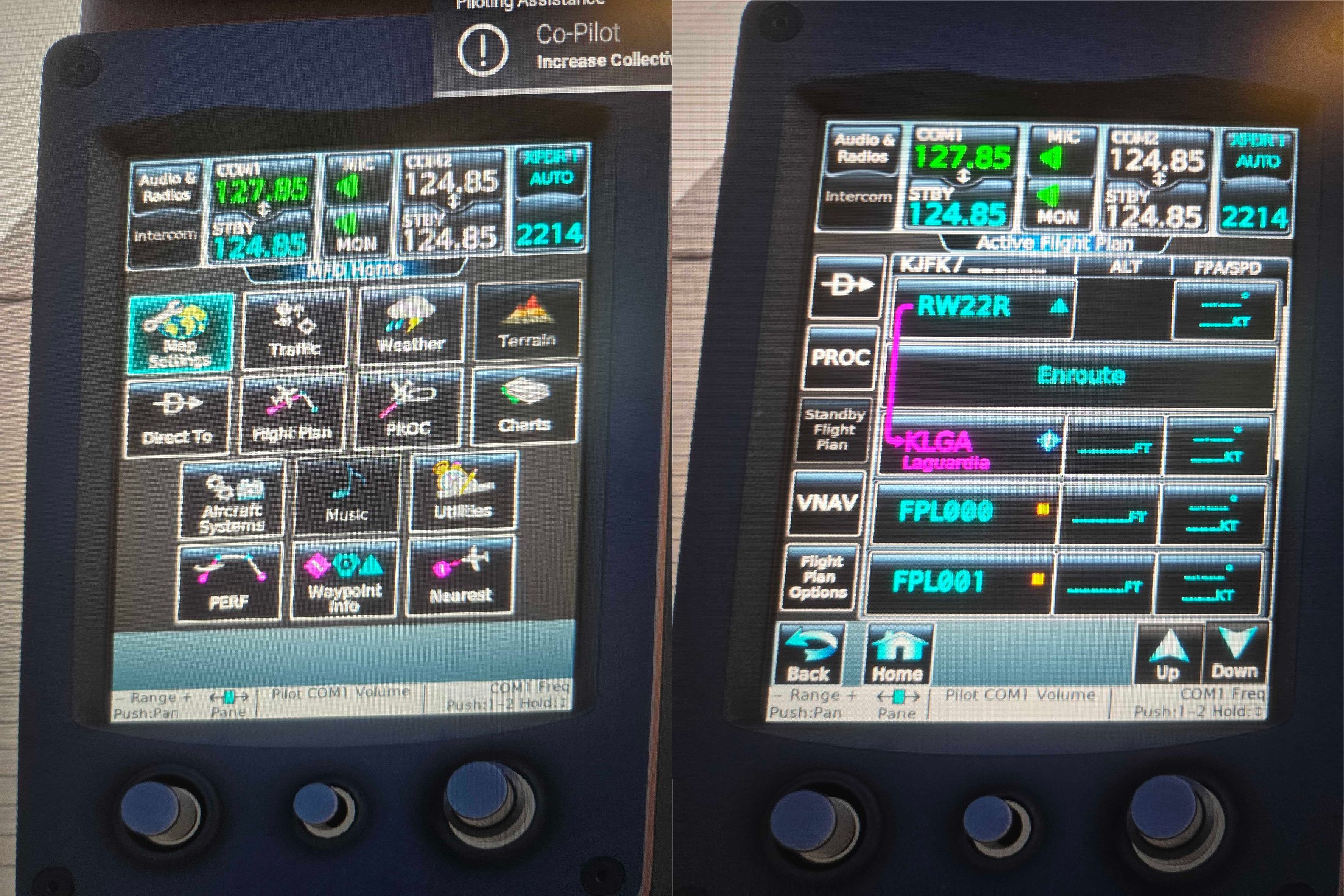
  1. The Garmin Touchscreen Controller

The third screen — a Garmin-style touchscreen panel showing the flight plan — was intentionally the simplest of the three, since it carried the least safety-critical information. That distinction turned out to matter more than expected once the team started thinking about latency.

Garmin Touchscreen Controller

How Long Does It Take to Build an Aviation Cockpit Prototype?

Three people worked on it for about a month and a half — and most of that time wasn’t spent prototyping at all.

Two to three weeks went into research: understanding pilot workflows, sitting in an aircraft simulator, and getting a feel for how a real cockpit is laid out before designing a pixel. The two main screens each took roughly a week to a week and a half to build and wire up to live data. A simpler secondary panel, showing just a flight plan, took a day or two.

ProtoPie helped the team move from research to a working, hardware-connected prototype in weeks rather than months. For comparison, the team estimated that building the same experience through a traditional workflow — creating full UI specifications and handing them off to engineers to code from scratch — would realistically take four to six months, largely because of the back-and-forth required to implement and refine complex, hardware-connected interactions.

The advantage wasn’t simply building the UI faster. It was getting to a realistic, testable experience earlier, so the team could see how the design actually behaved with live data and physical controls before committing to a full engineering build.

aviation prototyping set up flow

Aviation Cockpit Prototyping: Frequently Asked Questions

Q1. Can ProtoPie Connect work with other flight simulators?

Eric Lee: Yes, the setup will work on most flight simulators. There’s not a strict requirement for what kind of flight simulator you want to put. The only requirement is that as long as you’re able to extract the telemetry from the simulator and be able to code it to send to ProtoPie, you can use any simulator whatsoever.

Q2. How much coding is needed to connect flight simulator data to a prototype?

Eric Lee: Not much, actually. It’s pretty simple. The base of the custom plugin that we build on ProtoPie is based on Socket.io, which is a very simple in-and-out sending library. For actual hardware, like the joystick, we have specific plugins already embedded inside our ProtoPie Connect. But if any joysticks don’t work, you can also create a custom plugin for those.

Q3. How quickly can you update a hardware-connected prototype?

Eric Lee: The changes you can make are almost instantaneously. Everything that you saw on my screen, I can change a quick button or telemetry or reaction just instantaneously on ProtoPie Studio, and it will automatically reflect on the prototypes.

Q4. How much latency is there between flight simulator data and the prototype?

Eric Lee: The delay is basically instantaneous. We did not have an issue with the latency or any delay.

Q5. How does working with real hardware change what designers can learn from user testing?

Eric Lee: You’ll be able to save a lot more time in the product lifecycle. You don’t have to go back to code programmers to change something, and most of what you already want in the experience is already there in the cockpit, so you can already test it out with real-life users and you’ll be able to catch mistakes or find improvements a lot quicker and faster in your product lifecycle.

Q6. Is the simulator mainly used for flight, or can it be applied to other industries as well?

Eric Lee: ProtoPie started off building for mobiles and desktops, then we switched to smart TVs and smartwatches, then automobile, and now aviation, so for sure this can easily be applicable to something more complex like robotics.

Beyond Aviation: Prototyping Hardware-Connected Experiences

The technology behind this cockpit isn’t specific to aviation.

The same ProtoPie Connect setup can be used to connect prototypes with live data from other systems — and ProtoPie has already used similar approaches for automotive HMI prototypes.

The broader pattern applies to any product where the experience depends on something beyond a screen: vehicles, robotics, industrial equipment, connected devices, and other hardware-driven products.

The workflow starts with the interface design. Designs can come into ProtoPie Studio from Figma or Sketch, or increasingly through ProtoPie’s MCP integration for AI-assisted workflows. From there, Connect provides the bridge between the prototype and the real-world systems around it.

What “Mission-Critical” Means for Aviation Prototyping

Not every screen in a connected prototype deserves the same amount of engineering attention, and this project was a useful lesson in figuring out which ones do. The flight-plan panel could tolerate a little lag without anyone noticing. The primary flight display could not — speed, altitude, and heading needed to track the simulator closely enough that flying the aircraft actually felt like flying it. The team landed on updating telemetry roughly every quarter-second; a one- or two-second refresh, which they also tested, was noticeably less smooth. That’s the kind of tuning that’s easy to skip on a screen mockup and impossible to skip once real hardware and real control input are in the loop.

Have a hardware-connected prototype of your own in mind? Talk to our team about what ProtoPie Connect can do for your use case.